
Mondas Studio · AI employees
Your AI team.
Create AI employees in Mondas Studio, give them real jobs and check what they make. Filing, bookkeeping, data cleaning and admin, worked through while you get on with the day.
Put your team on your own computer with Mondas Agent, or work in your browser. Files stay on your device either way.
AI employees open when you subscribe, from £20 per user a month. See pricing
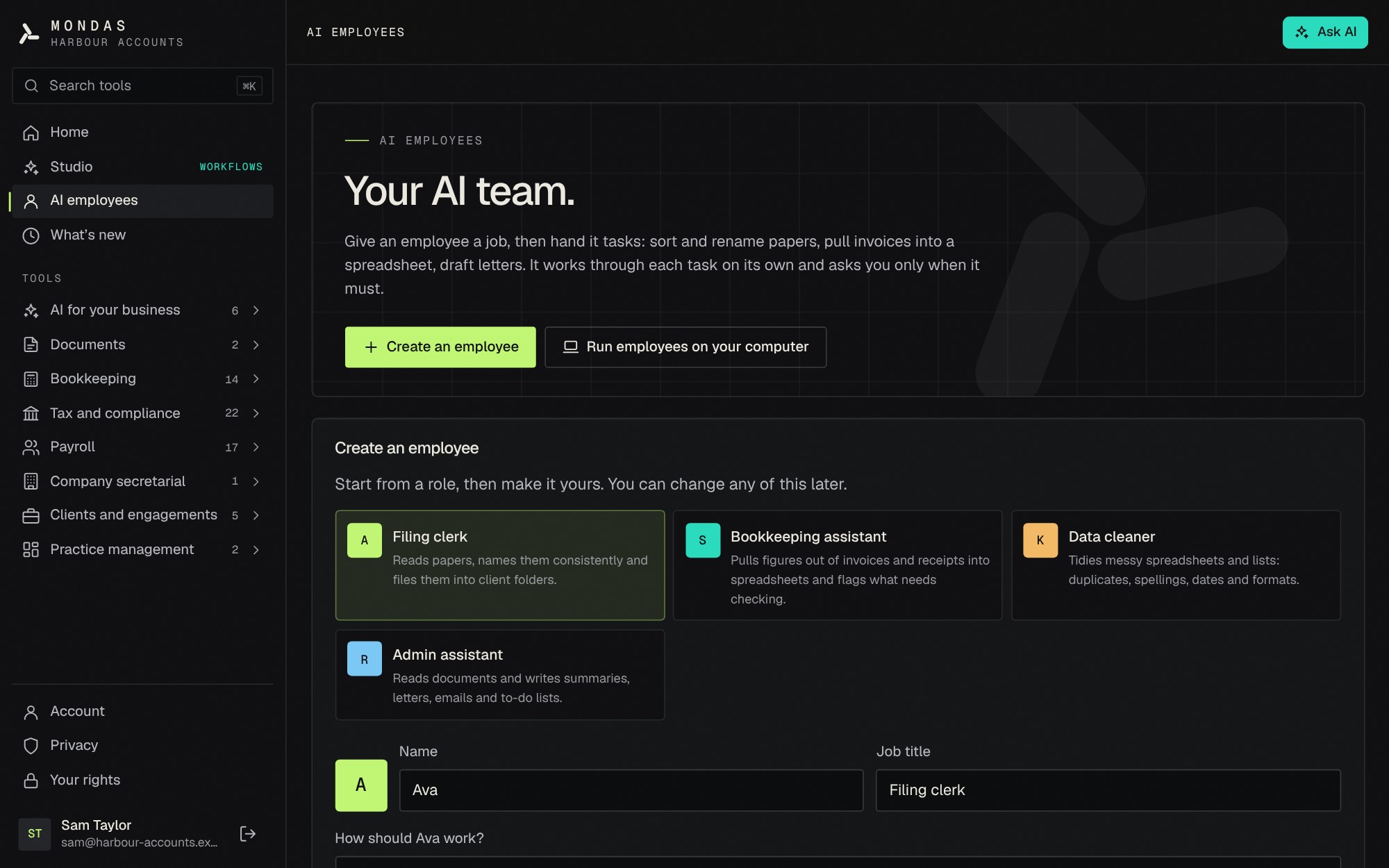 In-app screenshot
Creating an AI employee from a role template in Mondas Studio, in the browser.
Hire, brief, hand over, check.
An AI employee is set up once, then takes on as many tasks as you give it. You stay in charge of what it does and what leaves your computer.
- Step 1
Create an employee
Give it a name, a job title, instructions and skills: organise files, write files and bookkeeping. Or start from a role template: filing clerk, bookkeeping assistant, data cleaner or admin assistant.
- Step 2
Give it a task
Describe the job in your own words and point it at the files it needs.
- Step 3
It plans and works
The employee plans the job, works through it step by step and asks you when it needs a decision.
- Step 4
Check the summary
It finishes with a summary of what it did and what it made. You check the work before you rely on it.
See your whole team, and tell it what matters.
Mondas Agent has a dashboard for the team. You decide what each employee should know, and what the whole team should know about your business.
- 01
Your whole team at a glance
The Mondas Agent dashboard shows every employee, what each one is working on now and who needs you.
- 02
Tell each one what to know
Give each employee the context it needs for its job, such as how you like things done. Change it whenever things change.
- 03
Tell the team about your business
Write down what the whole team should know about your business once, and every employee works with it in mind.
Work that gets started without you.
Once an employee is on your computer with Mondas Agent, regular work can run by itself. You only step in when you are needed.
- 01
Standing tasks
A standing task picks up new files by itself, so work starts without you asking each time.
- 02
Routines on a schedule
Set regular jobs for set times: a weekly summary, filing the inbox, or a month-end check.
- 03
Starts with the computer
Mondas Agent starts when your computer does, so the team is ready when you sit down.
- 04
Several at once
With Claude as the brain, up to three employees can work at the same time.
- 05
Tells you when it needs you
Your computer notifies you when someone needs a decision, so you do not have to keep watching.
- 06
Only in the folder you choose
Each employee works only in the folder you give it. Nothing is ever deleted, and your own files are never overwritten.
Invoices and receipts, ready to check.
The Bookkeeping assistant records what each invoice and receipt says into a CSV file for you to check. It never posts anything to your accounting software.
- Net plus VAT equals the gross total
- The VAT rate is checked
- Duplicates are flagged, so the same invoice is not recorded twice
- Missing details are flagged
The checks are done by tested code, not by AI. The assistant reads the documents, and the code makes sure the figures add up.
Anything the assistant is unsure of is marked Needs checking, so you know where to look first.
In the browser or on your computer.
You create employees in Studio and can work in your browser. Mondas Agent is a download for Mac and Windows that puts the team on your own computer, so it can work on its own.
| In the browser | Mondas Agent on your computer | |
|---|---|---|
| Where it works | In Mondas Studio, in your browser. | On your Mac or Windows computer, in the folders you choose, with a dashboard that shows who needs you. |
| Your files | Stay on your device. They are not uploaded to Mondas. | Stay on your computer, in the folders you choose. |
| When it works | While its page is open, on a task you start. | Any time the computer is on: it starts with the computer and can run standing tasks and routines. |
| Several at once | Work on a task you start. | With Claude, up to three employees work at once. |
| Give tasks in Studio. | Optional. Connect an account so listed owners can email work in. Replies only go to them. | |
| Brain | Claude through your Mondas account, with personal details hidden in your browser first. | Claude through your Mondas account with personal details hidden on the computer first, or a model that runs only on the computer and sends nothing. |
Built for client data from the start.
Bookkeeping work is full of personal and financial details. Here is how the team looks after them.
Details hidden on your device
Names, emails, phone numbers, addresses, National Insurance numbers, UTRs, bank details, dates of birth, passport, driving licence and NHS numbers are hidden before anything is sent to Claude.
Sensitive files held back
Files that look like they contain health, criminal-record or other special category information are not sent to Claude, and a person is told.
Mondas does not keep it
AI requests pass through Mondas to Anthropic, outside the UK. Mondas does not store or log them.
Or send nothing at all
Mondas Agent can think with a model that runs only on your computer. Nothing is sent anywhere.
Hiding details works by recognising patterns, which cannot catch every detail. Check what your employees make before you rely on it. Read the full detail in GDPR and privacy and security.
What AI employees will not do.
The team prepares and organises. The decisions, and anything that leaves your control, stay with you.
- Post to your accounting software
- File anything with HMRC
- Send money
- Delete your files: they archive instead
- Overwrite your files
- Email anyone except the owners you list
Questions about AI employees
Do my AI employees need an email account?
No. You can give them work from the Mondas Agent dashboard or in Studio. If you want to, you can connect an email account so the owners you list can email work in. Replies and files only go to those owners.
What is the difference between AI employees in the browser and Mondas Agent?
In your browser, an employee works on a task you start, while its page is open. Mondas Agent is a download for Mac and Windows that puts your team on your own computer, where it can run standing tasks and routines, start with the computer and work several at a time.
Do my files leave my computer?
Files stay on your device. When an employee thinks with Claude, only the text it needs for a task is sent, with personal details hidden on your device first. With a model that runs only on the computer, nothing is sent.
What happens to files with sensitive information in them?
Files that look like they contain health, criminal-record or other special category information are held back from Claude, and a person is told.
Can I rely on the work without checking it?
No. Hiding personal details works by recognising patterns, which cannot catch every detail, and AI can make mistakes. Check what an employee makes. The Bookkeeping assistant marks anything it is unsure of as Needs checking.
Can an AI employee delete or change my files?
It never deletes anything: it archives instead. It does not overwrite your files, and it works only in the folder you choose.
How much do AI employees cost?
AI employees are included on the paid plan: £24 per user a month, or £20 a month billed yearly, with no VAT added. There is a free 24-hour trial of the tools and AI, and AI employees open when you subscribe.
Who can use Mondas Studio?
Mondas Studio is login-only, for UK bookkeepers, accountants and small businesses. Request a free trial and we will set up your account.
Mondas Studio · AI employees and tools
Meet your AI team.
Request a free 24-hour trial of Mondas Studio and its 70 tools. AI employees open when you subscribe, at £24 per user a month or £20 billed yearly. No card needed for the trial.
Running a practice or keeping your own books? See how the bookkeeping, tax and VAT and practice admin specialists prepare work for you to approve, or the small business page. Accountancy practices can also apply for the 30-day pilot.